mcpspan

See how AI agents use your MCP server.

Analytics for MCP servers. Which tools agents call, from which client, how long calls take, how they fail, and what agents ask for that your server doesn't have. Open source, with SDKs in eight languages: use it hosted, or run it yourself.

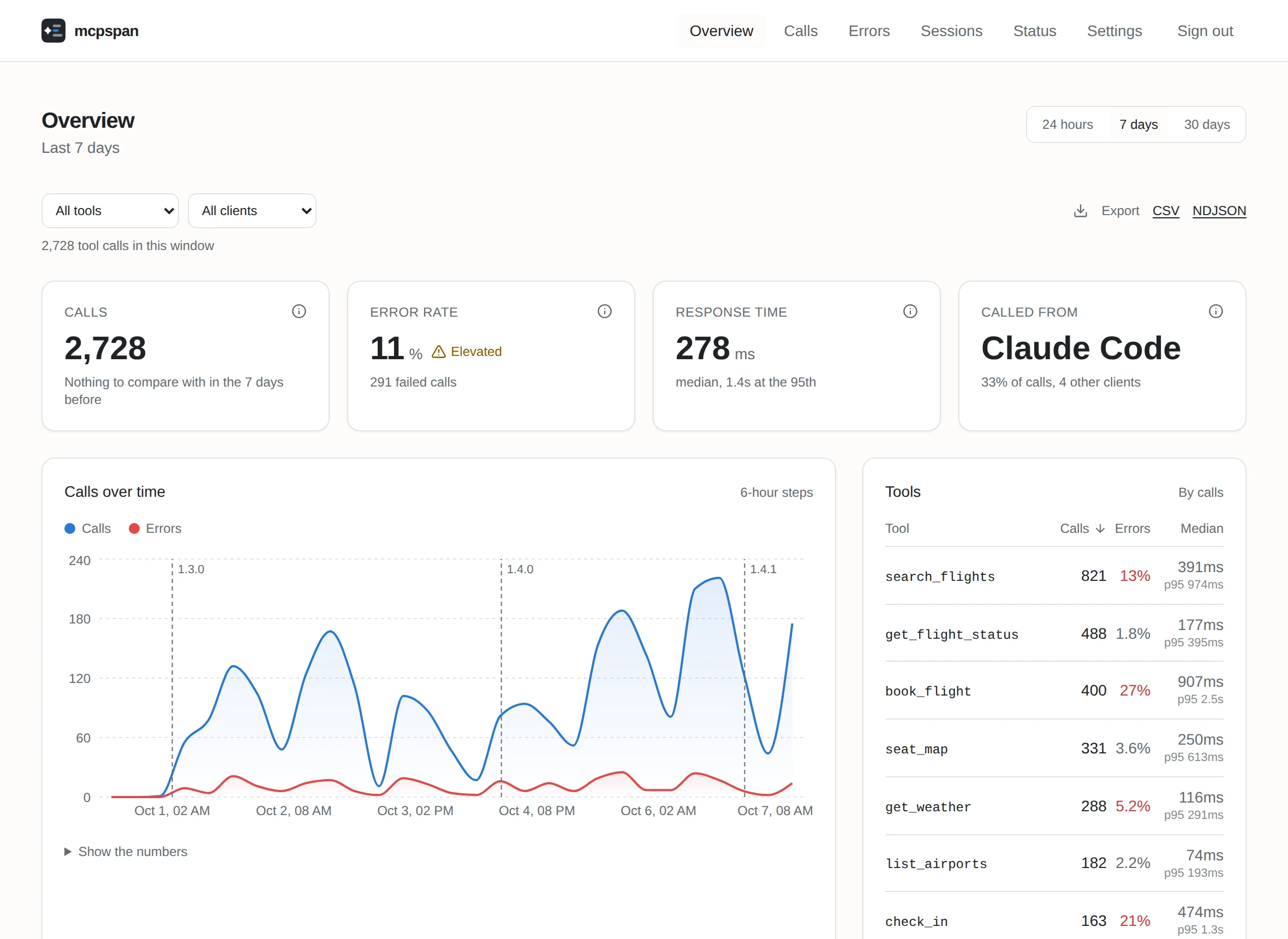
The mcpspan overview: calls, error rate and response time for one server, with calls over a week
Screenshots on this page are from a demo server with simulated traffic.

What your logs don't show

Requests come in and responses go out, so a server can look healthy while agents struggle with it. These are the patterns that only show up once you look at calls the way an agent makes them.

Tools agents asked for that you don't have

Agents guess names. searchFlights next to your search_flights is a naming problem, not a missing feature, so the closest name you do have is shown beside it.

You also see which clients asked, and what the agent did next: found the right tool, or gave up.
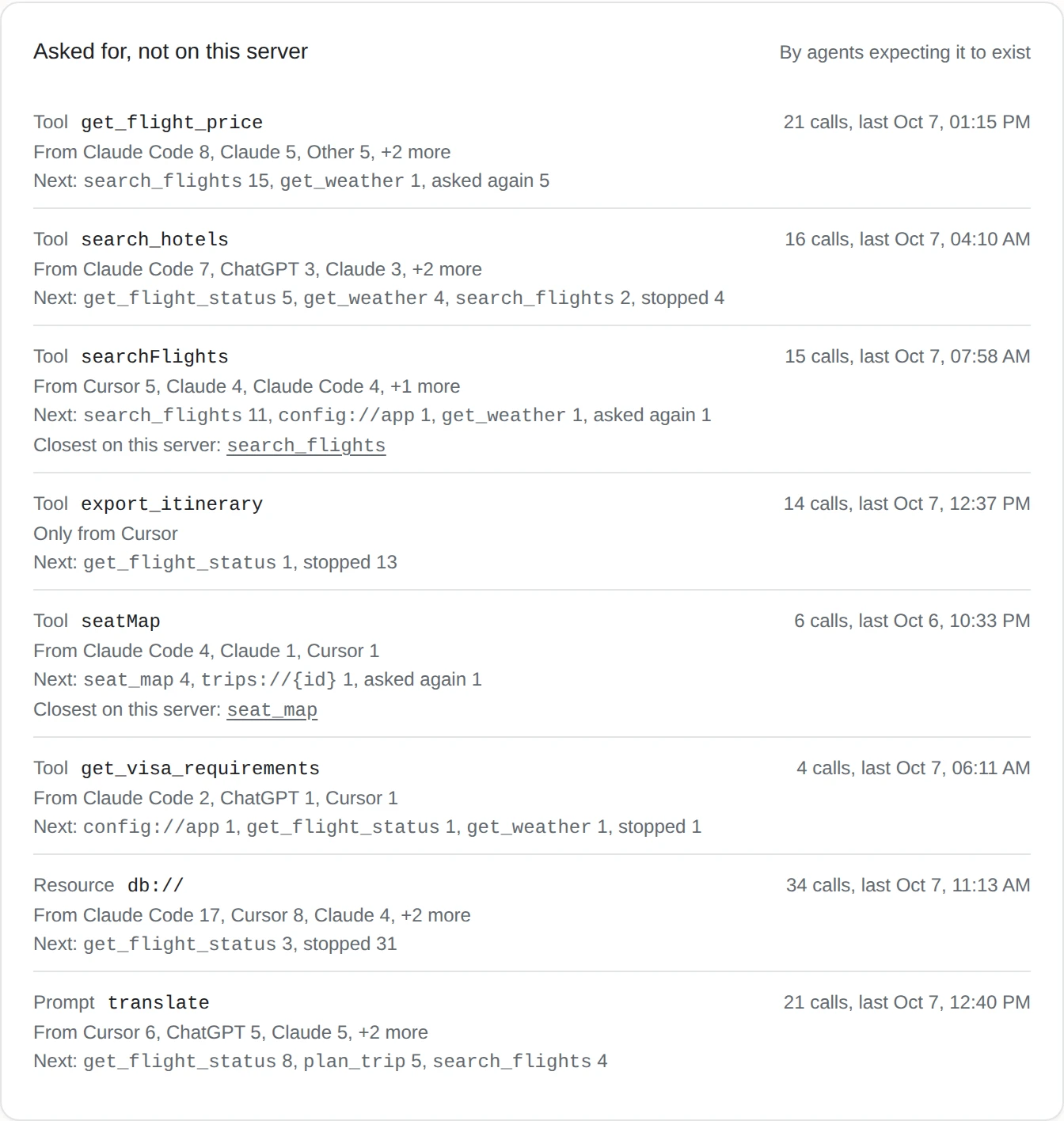
Tools agents asked for that the server does not have, with the closest existing name

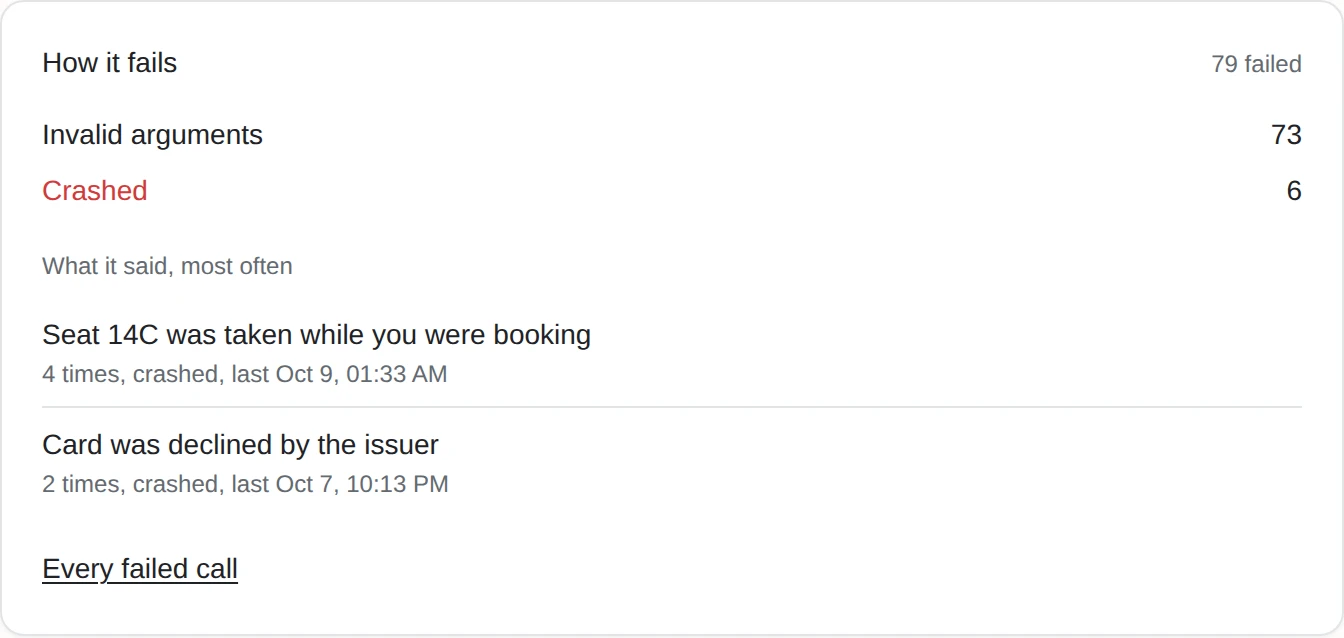
Failures, told apart

Arguments the server refused, a handler that crashed, a tool that answered with an error. Refused arguments never reach your code, so they are the failures you'd otherwise never count.

How one tool fails: invalid arguments and crashes, with the most common messages

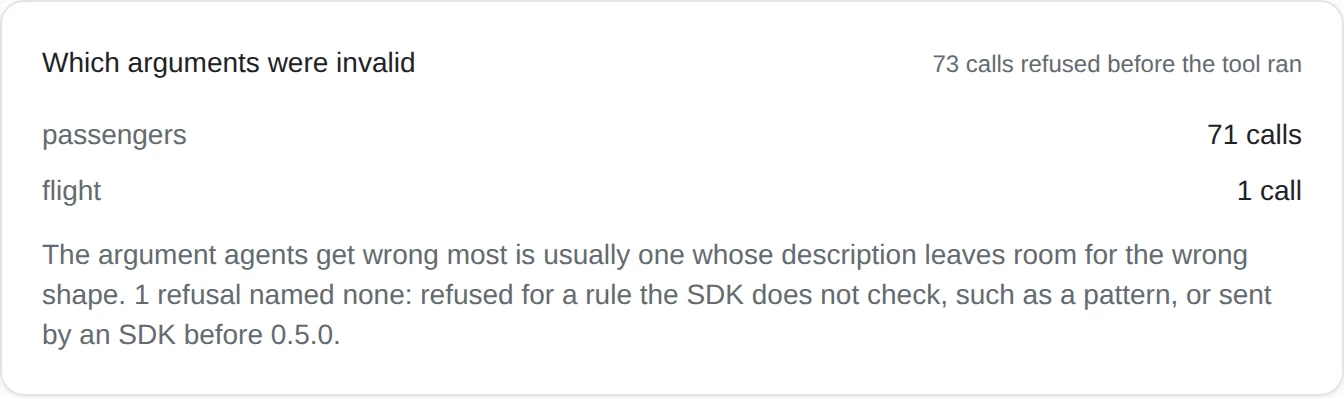
Which argument was wrong

When your server refuses a call's arguments, the SDK checks them against the tool's schema in your process and names the ones that did not match, never their values. Here 71 of 73 refusals were passengers: one sentence of the tool's description to fix.

Which arguments were invalid: 73 calls refused, 71 of them over passengers

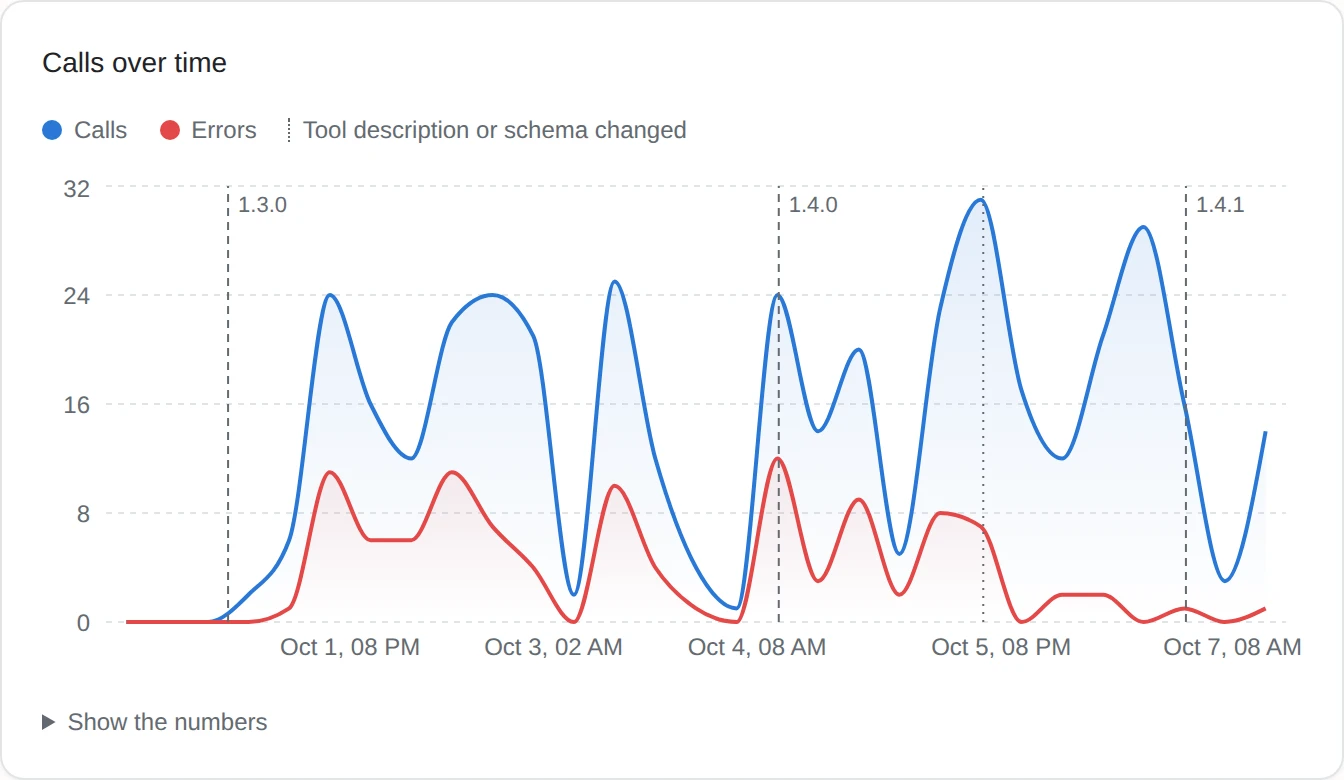
When a description changed

Rewording a tool's description can change how agents use it more than a change to its code. Each tool's chart marks where its description or input schema changed, next to your releases.

A tool's calls and errors over a week, with errors stopping where its description changed

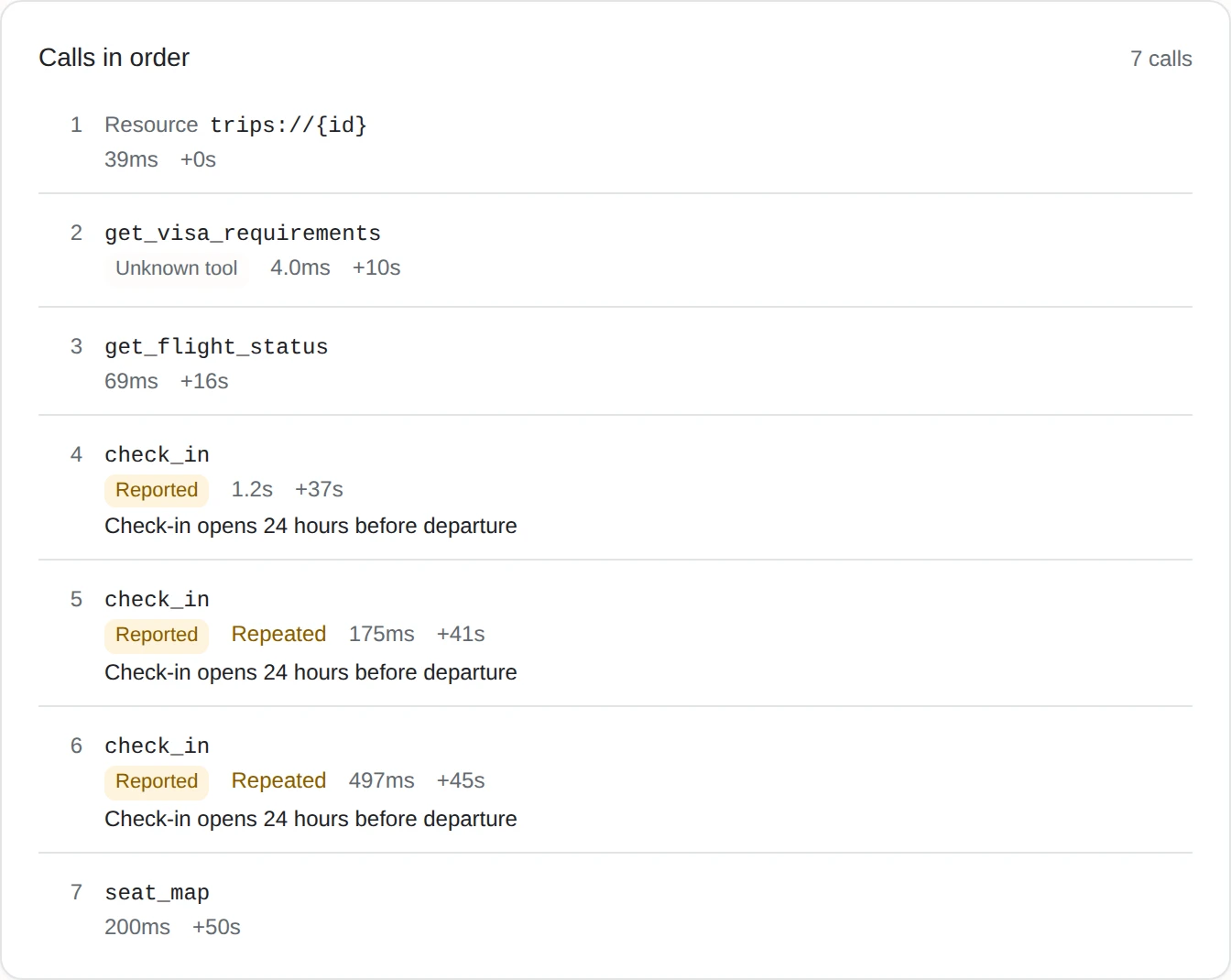
Agents stuck in a loop

An agent sending the same call again usually didn't get an answer it could act on. Calls that repeat the previous call's arguments are marked in each session and counted per tool. A tool's page also shows which call came right before it repeated or failed, by client.

The comparison happens in your server's process. Only whether a call repeated is sent.

One session where the agent calls check_in again with the same arguments after being told check-in is not open

Answers too big for the context

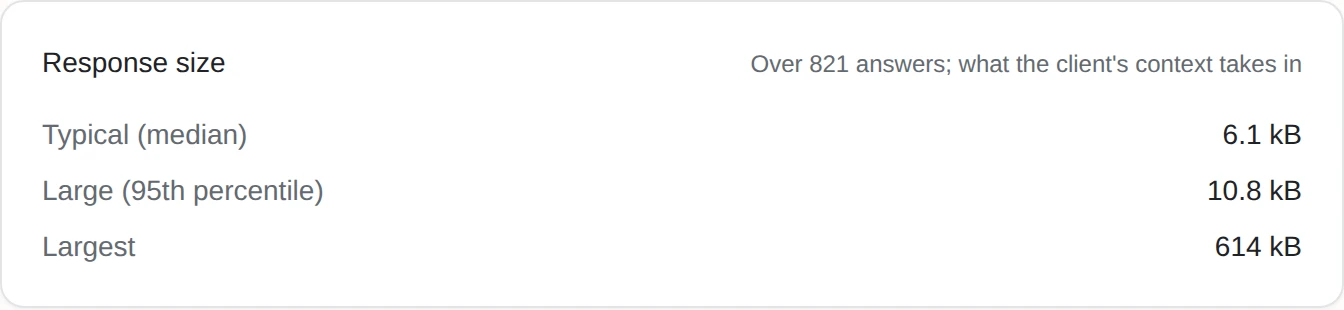
A tool that is fast but now and then returns hundreds of kilobytes looks fine on every latency chart, while it fills the agent's context. Typical, large and largest answer, per tool.

Response sizes for one tool: typical, large and largest answer
  • Every call, every client. Tool calls, resource reads and prompt gets, from Claude, Claude Code, Cursor, VS Code, Codex, ChatGPT and the rest.
  • What agents are shown. How many tokens your tool list costs each session, and which tools agents were shown and never called.
  • Response times that mean something. Median, 95th percentile and the full distribution per tool.
  • Sessions. Each connection's calls, step by step, as the agent made them.
  • Releases. Every call carries the server version that answered it, compared with the one before.
  • Alerts to Slack, Discord or any webhook when errors climb or a server goes quiet.
  • Your data, yours to take. CSV and NDJSON exports, and forwarding to OpenTelemetry.
  • No code to change, if you prefer. Put mcpspan-proxy in front of any MCP server, over stdio or HTTP, in any language.
  • A linter for tool definitions. npx mcpspan-lint finds what breaks clients or confuses agents before you ship. No account needed.

Running in a few minutes

You need Docker. mcpspan runs on your machine or your server, and nothing is sent anywhere you didn't set up.

Start mcpspan

git clone https://github.com/mcpspan/mcpspan.git
cd mcpspan
docker compose up -d

Open localhost:6270, create your account, and copy the API key for your first server.

Add one line to your server

npm install mcpspan
import { instrument } from 'mcpspan';

instrument(server, {
  apiKey: process.env.MCPSPAN_API_KEY,
  endpoint: 'http://localhost:6271',
});

On @modelcontextprotocol/sdk, anywhere before the server starts.

import { configure, instrument } from 'mcpspan';

configure({
  apiKey: process.env.MCPSPAN_API_KEY,
  endpoint: 'http://localhost:6271',
});

// Then on each server the SDK builds, in createMcpHandler or serveStdio:
instrument(server);

On @modelcontextprotocol/server, which builds servers for you: configure once, instrument each one.

pip install mcpspan
from mcp.server.fastmcp import FastMCP
import mcpspan

mcp = FastMCP("flights")
mcpspan.instrument(mcp, endpoint="http://localhost:6271")
from mcp.server.mcpserver import MCPServer
import mcpspan

mcp = MCPServer("flights")
mcpspan.instrument(mcp, endpoint="http://localhost:6271")
from fastmcp import FastMCP
import mcpspan

mcp = FastMCP("flights")
mcpspan.instrument(mcp, endpoint="http://localhost:6271")

The key is read from MCPSPAN_API_KEY.

go get github.com/mcpspan/mcpspan/packages/mcpspan-go/mcpsdk
mcpsdk.Instrument(server, mcpspan.Config{
    APIKey:   os.Getenv("MCPSPAN_API_KEY"),
    Endpoint: "http://localhost:6271",
})
defer mcpspan.Shutdown(context.Background())
go get github.com/mcpspan/mcpspan/packages/mcpspan-go/mcpgo
mcpgo.Instrument(s, mcpspan.Config{
    APIKey:   os.Getenv("MCPSPAN_API_KEY"),
    Endpoint: "http://localhost:6271",
})
defer mcpspan.Shutdown(context.Background())
dotnet add package McpSpan
builder.Services.AddMcpServer()
    .WithStdioServerTransport()
    .WithToolsFromAssembly()
    .WithMcpSpan(new McpSpanOptions
    {
        ApiKey = Environment.GetEnvironmentVariable("MCPSPAN_API_KEY"),
        Endpoint = "http://localhost:6271",
    });

The official MCP C# SDK.

implementation("com.mcpspan:mcpspan-java-sdk:0.4.0")
McpServer.sync(McpSpanJavaSdk.instrument(
        new StdioServerTransportProvider(McpJsonDefaults.getMapper()),
        McpSpanOptions.builder()
            .apiKey(System.getenv("MCPSPAN_API_KEY"))
            .endpoint("http://localhost:6271")
            .build()))

The official MCP Java SDK, from Java or Kotlin.

cargo add mcpspan
let _mcpspan = mcpspan::configure(
    mcpspan::Options::default().endpoint("http://localhost:6271"),
);
let server = mcpspan::instrument(Flights::new()).serve(stdio()).await?;

rmcp. The key is read from MCPSPAN_API_KEY.

bundle add mcpspan
McpSpan.instrument(server,
  api_key: ENV["MCPSPAN_API_KEY"],
  endpoint: "http://localhost:6271")

The official Ruby SDK, the mcp gem.

composer require mcpspan/mcpspan
MCPSPAN_API_KEY=mcps_...
MCPSPAN_ENDPOINT=http://localhost:6271

No code: add these two lines to .env and every MCP server in the app is measured.

$server = McpSdk::instrument(Server::builder(), [
    'apiKey' => getenv('MCPSPAN_API_KEY'),
    'endpoint' => 'http://localhost:6271',
])
    ->setServerInfo('flights', '1.0.0')
    ->build();

One call on the builder, before build().

Measuring one tool, leaving one out, and every option, for each language, in the documentation.

Private by design

Your server, your data. Self-hosted, calls go from your MCP server to your mcpspan installation and nowhere else.

No parameter values. Values never leave your server's process. Parameter names and types are recorded only if you turn that on, and error messages can be turned off.

Open source. MIT licensed, the server and all eight SDKs. Read what is sent before you send it.